Reporting and Analytics
Explore TestInvite's reporting and analytics capabilities for analyzing performance, benchmarking results, generating custom reports, and gaining deeper assessment insights.
Analyze exam results with powerful reporting and analytics tools. TestInvite helps you understand candidate performance, compare results across groups, generate customized reports, and turn assessment data into actionable insights.
View Instant Exam Performance Summaries
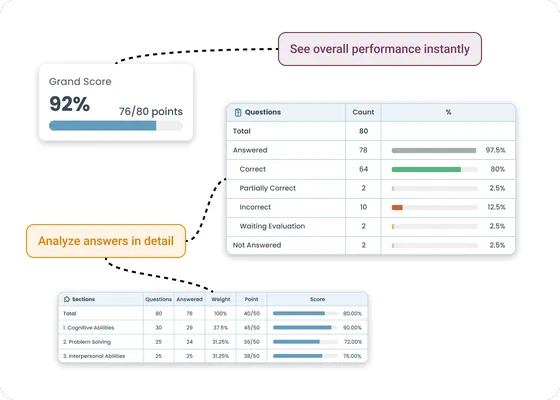
Once a test is completed, TestInvite automatically generates structured performance summaries that provide a quick overview of candidate results across the entire assessment.
- The overall performance summary displays the candidate’s total score, the maximum possible score, and the corresponding percentage, offering a clear picture of overall performance.
- The question-level summary shows how the candidate interacted with the exam. It presents the total number of questions displayed, the number of correct and incorrect responses, questions that require manual evaluation, and any unanswered questions.
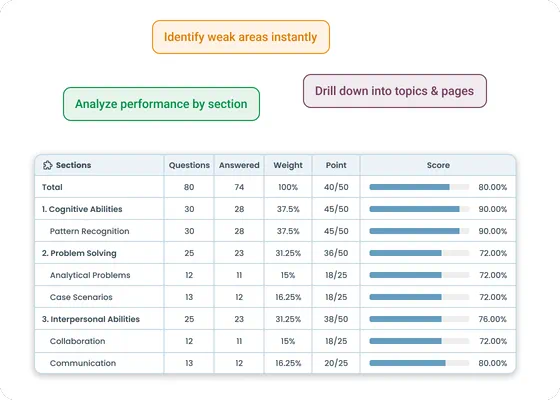
- The section-level summary breaks down results across the sections of the exam and displays the candidate’s score, maximum score, and performance percentage for each section.
Analyze Results Across Sections and Dimensions
TestInvite allows administrators to examine performance through the structural layers of an assessment. This makes it possible to understand results beyond a single total score.
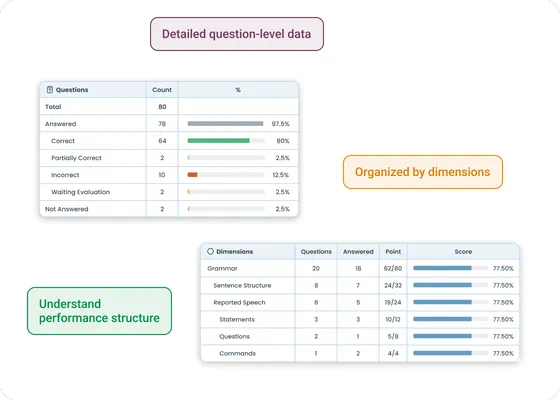
- The hierarchical scoreboard organizes exam sections and dimensions in a tree structure and shows how different parts of the assessment contribute to the final result. At each level, the system presents the total number of questions, the maximum attainable points, the section weight within the exam, the candidate’s score, and the corresponding performance percentage.
- Questions can also be mapped to defined dimensions including topics, subjects, subtopics, competencies, or skills. Each question can contribute to one or multiple dimensions, and dimensions can be organized hierarchically to reflect relationships between competencies or categories. Configurable weights determine how strongly each question influences the dimension score.
Benchmark Candidate Results Against Reference Groups
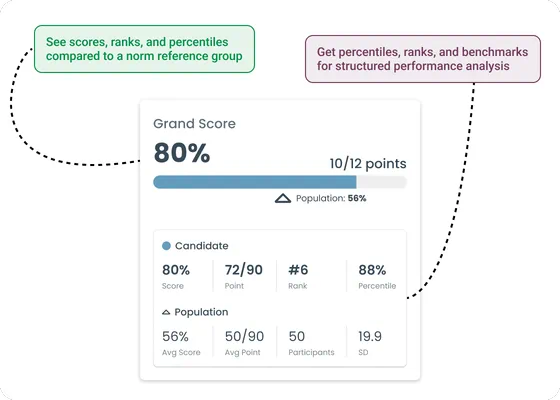
TestInvite supports norm-based performance comparisons that help organizations evaluate candidates relative to a defined population.
- The population overview summarizes the reference group used for comparison and presents key indicators, including the candidate’s sten score, rank, and percentile.
- Candidate results can also be evaluated against comparison benchmarks. Results may be compared with automatically generated population norms or with predefined benchmark values set by the organization.
- Radar charts visualize candidate performance across sections or dimensions together with benchmark values, making it easier to identify strengths and weaker areas within the assessment.
Analyze Performance at the Section and Page Level
Understand how candidate activity is distributed across different parts of the exam through detailed section and page-level reporting.
- TestInvite can generate structured reports that present performance at both the section and page level. This makes it possible to see how candidate activity is distributed throughout the exam.
- The detailed breakdown helps identify where candidates struggled, disengaged, or performed strongly, supporting deeper performance analysis beyond overall scores.
Evaluate Exam Quality with Statistical Analysis
TestInvite includes statistical tools that help administrators evaluate the quality and performance of assessments.
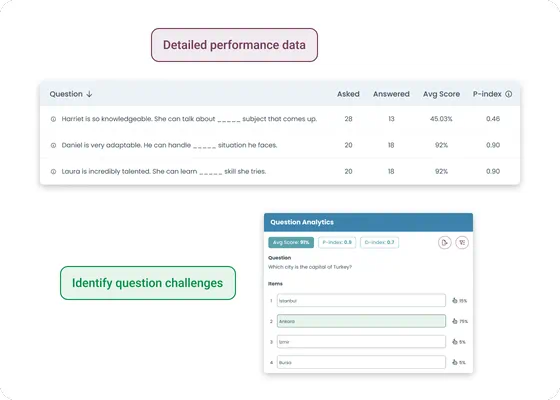
- Item analysis provides insights into how individual questions perform within an assessment. The system reports metrics such as the number of presentations, number of responses, average score, P-index indicating difficulty level, and D-index.
- For multiple-choice questions, answer analysis also shows how frequently each option was selected. These insights help identify questions that may need revision or improvement.
- The platform also provides statistics that evaluate how the overall exam performs across all submissions. These statistics include the number of completed attempts, average score, standard deviation, minimum score, and maximum score.
- Performance statistics can additionally be examined at the section or dimension level to better understand patterns across different parts of the assessment
Design Custom Assessment Reports
TestInvite provides flexible tools that allow organizations to fully control how assessment results are presented.
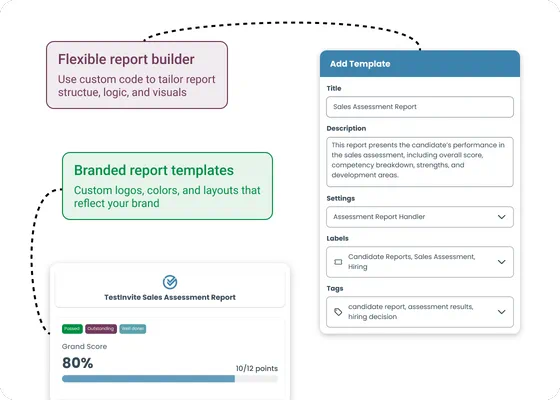
- Reports can be created using customizable HTML and CSS templates, while JavaScript functions can process score data to control report logic and visualization.
- Reports can include organization logos, custom headers, and other branding elements. This ensures that generated reports remain consistent with the organization’s visual identity.
- For organizations with specialized reporting requirements, additional custom report development can also be implemented.
Generate Dynamic Candidate Reports
Assessment reports can dynamically adapt to each candidate’s results using score-based conditions.
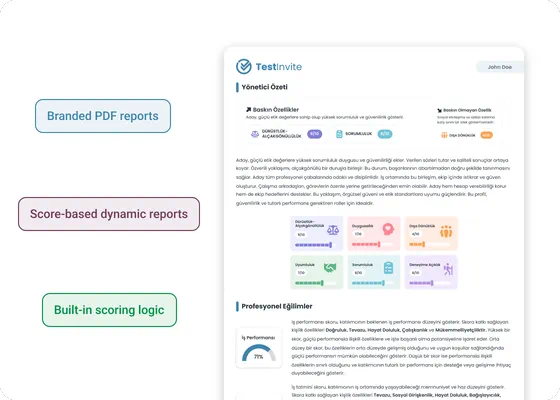
- Different feedback texts can be triggered automatically depending on score thresholds. Both overall scores and dimension scores can be used to generate personalized report content.
- Administrators can define score intervals that automatically classify candidates into performance levels. Each level can include custom labels, descriptive explanations, and color indicators.
- Custom interpretations can be defined for specific score ranges. Each interpretation can include a title, explanatory text, visual indicators, and configurable placement within the report. Interpretations may appear at the overall test level or within individual sections.
- Passing thresholds can be configured with custom messages for both successful and unsuccessful candidates. These messages may include feedback, status notifications, or instructions for next steps.
Review Candidate Answers in Detail
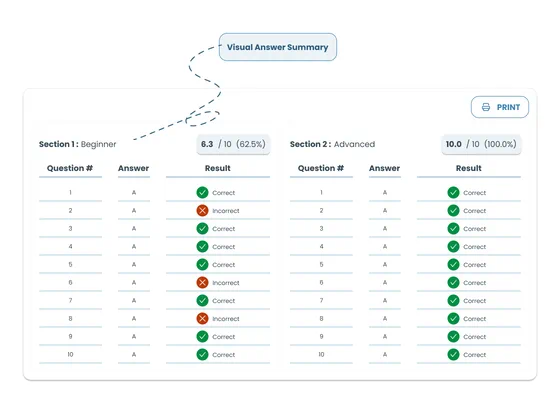
Administrators can review the complete set of questions presented during the exam together with the candidate’s responses.
- The report interface displays every question that appeared during the exam together with the candidate’s selected responses.
- A structured answer sheet can also be downloaded, showing each exam question along with the candidate’s selected answer.
- Responses are clearly marked as correct, incorrect, partially correct, or unanswered, providing a transparent and review-ready record of candidate responses.
Export Assessment Data and Reports
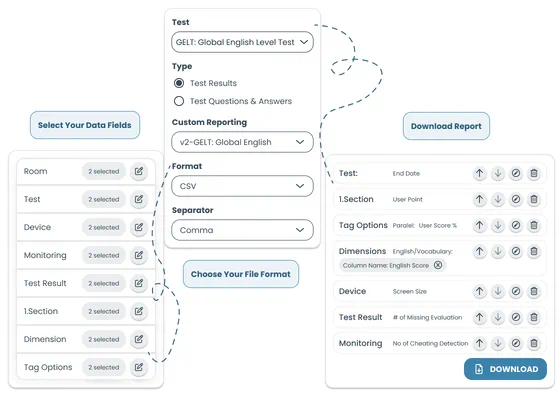
TestInvite supports exporting exam data and documentation in multiple formats for external use and integration.
- Administrators can select which data fields to include when exporting exam data. Export files may contain participant information, exam details, device information, monitoring records, scoring results, and custom report outputs.
- Export files can be generated in formats such as CSV, JSON, or HTML. These files can be used to automate reporting workflows or integrate exam data with external systems.
- Any report can also be instantly converted into a PDF document. Reports can be automatically delivered via email as PDF attachments when needed.
- The system can additionally generate a comprehensive exam record suitable for documentation or archiving. This record may include exam session information, participant details, overall results, section and page structures, dimension mappings, and the full set of questions together with candidate responses.
Manage Result Access and Certification
Administrators can control when candidates see their results and how certification is issued.
- Result visibility can be configured so that candidates receive their results immediately after exam completion, after a specific section or page, or at a scheduled date and time.
- Administrators receive full analytical reports, while participant reports can be configured to present structured performance feedback tailored to candidates.
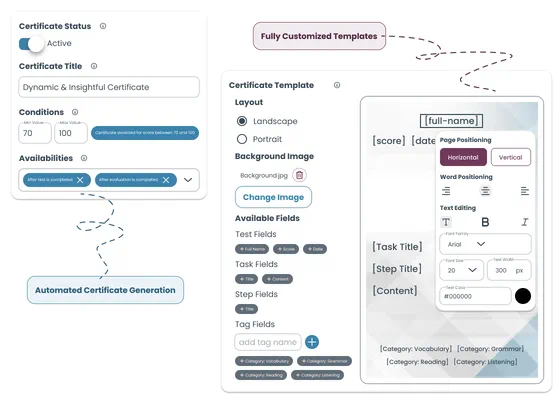
- Certificates can be generated automatically once predefined conditions are satisfied. Certificate issuance may depend on criteria such as the passing score, performance level, or other custom rules.
- Organizations can upload their own certificate templates and automatically generate certificates populated with candidate information.