

Getting started Product Tour Question Bank Question Types Test Editor Grading and Evaluation Lockdown Browser Online Proctoring
Organization management Setting Up Your Organization General Settings Configuring Consent Process Branding Plans & Credits Understanding Subscription Plans Managing Credits Changing Subscription Plans Billing Settings Credit Notifications Users and Collaboration Roles and Permissions Adding New Users & Assigning Roles Importing Users Organizing Users into Teams Advanced Permissions & Access Control User Login Controls Monetization
Question Bank Creating a Question Adding Image Adding Audio Adding Video Adding File Editing Layout Adding Feedback Adding Hint Math Input Importing Questions Question Reporting Scoring Question Types Multiple Choice Questions Matching Questions Text-Based Questions Rich Content Questions Numeric Questions Coding Questions Audio Recording Video Recording Photo Capture File Upload Fill-in-a-Table Questions Organizing Questions Folders and tags Batch update Schema Browsing Questions Exporting Questions Presets Composites
Tests (deprecated) Creating a Test Pages Sections Adding Questions Previewing Test Setting Profile Test Type Test Navigation Time-Limits Auto Numberings Mandatory Question Security Shuffling Deprecated Customize Section Weights Randomization Reporting
Tests Creating a New Test Test Settings Quick Exam Creation Creating Randomized Tests Adding Questions Sections Automatic Question Exclusion Shuffling Pages Time Limit Navigation Control Section Introduction Page Structure Shuffle Questions Time Limit Layout
Tests

Page Structure

Page Settings control page layout, question order, and time limits. They define how each page is displayed and behaves.

Updated 2026/04/17

Page Settings define how each page is structured and behaves during the test. They allow manual control over layout, question order, and timing.
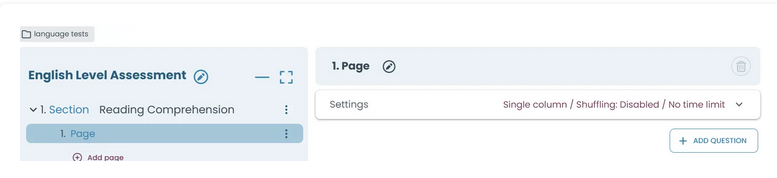
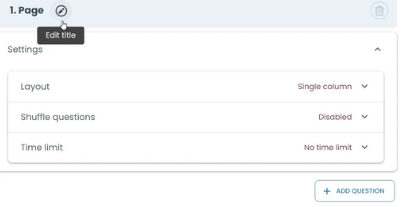
Click the page to open its settings.
Here you can edit the title and view layout, shuffling, and time limit settings.

These features are explained in their respective sections:

Layout

Defines how content is arranged on the page, including single and double column structures.

Time Limit

Controls how long candidates have to complete the page.

Shuffle Questions

Randomizes the order of questions to create different sequences for each candidate.

Page Flow

Determines how pages are generated and delivered, including Random Page Picker, Dynamic Page Builder, and Static Page Builder.


Randomly select pages from a group to show different content to each candidate during the test.

The Dynamic Page Builder automatically creates pages by selecting questions from a question pool and distributing them across generated pages.

Build test pages manually by adding and arranging questions.