

Getting started Product Tour Question Bank Question Types Test Editor Grading and Evaluation Lockdown Browser Online Proctoring
Organization management Setting Up Your Organization General Settings Configuring Consent Process Branding Plans & Credits Understanding Subscription Plans Managing Credits Changing Subscription Plans Billing Settings Credit Notifications Users and Collaboration Roles and Permissions Adding New Users & Assigning Roles Importing Users Organizing Users into Teams Advanced Permissions & Access Control User Login Controls Monetization
Question Bank Creating a Question Adding Image Adding Audio Adding Video Adding File Editing Layout Adding Feedback Adding Hint Math Input Importing Questions Question Reporting Scoring Question Types Multiple Choice Questions Matching Questions Text-Based Questions Rich Content Questions Numeric Questions Coding Questions Audio Recording Video Recording Photo Capture File Upload Fill-in-a-Table Questions Organizing Questions Folders and tags Batch update Schema Browsing Questions Exporting Questions Presets Composites
Tests (deprecated) Creating a Test Pages Sections Adding Questions Previewing Test Setting Profile Test Type Test Navigation Time-Limits Auto Numberings Mandatory Question Security Shuffling Deprecated Customize Section Weights Randomization Reporting
Tests Creating a New Test Test Settings Quick Exam Creation Creating Randomized Tests Adding Questions Sections Automatic Question Exclusion Shuffling Pages Time Limit Navigation Control Section Introduction Page Structure Shuffle Questions Time Limit Layout
Tests Sections

Navigation Control

Navigation Control defines how users move between sections and what navigation actions are allowed.

Published 2026/04/16

Navigation control determines how candidates can move between pages within a section.

It allows test creators to control whether candidates can review previous pages, move forward freely, or stay locked on the current page.
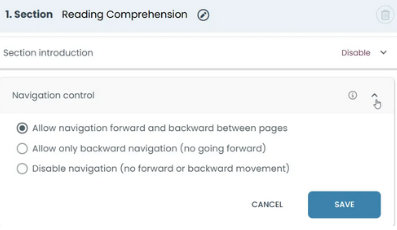
Set Navigation Control to define how candidates can move between pages in the section.

Allow navigation forward and backward between pages

Candidates can move freely between pages.

They can go forward, go back, and change their answers.

Why use it

- When answers may need review

- When flexibility is required

- Common in writing tests and surveys

Allow only backward navigation (no going forward)

Candidates can go back, but cannot move forward again after leaving a page.

Example:

Page 1 → Page 2 → Back to Page 1 → Cannot return to Page 2

Why use it

- To prevent previewing upcoming questions

- To control test progression

- When answers should not depend on later questions

Disable navigation (no forward or backward movement)

Candidates cannot move between pages freely.

They cannot return once they continue.

Why use it

- To enforce strict test flow

- To prevent changing answers

- Common in secure or proctored tests