

Adding Questions
Adding Questions allows you to build your test by selecting and organizing questions. You can create a clear structure and ensure your assessment covers all required topics.
Add Question lets you manually add or create content and questions on the page. You can choose different methods depending on how you want to build your page.
Questions per Page and Best Practices
- You can add one or more questions to a page in the Page Settings.
- If you add multiple questions to a page, the candidate answers them all and submits them together when moving to the next step.
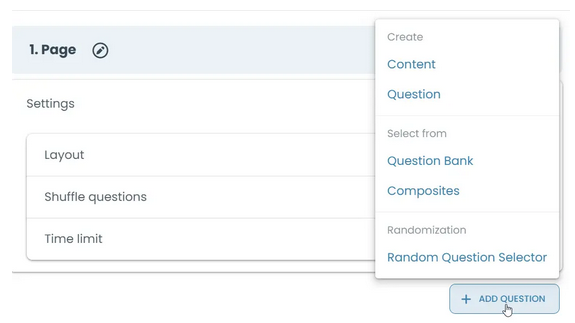
Quick summary
Add Question provides different ways to add content and questions to the page:
Content → Add text or media
Question → Create a new question
Question Bank → Select existing questions
Composites → Add grouped questions
Random Question Selector → Add questions automatically based on rules
Detailed explanations of each feature are provided below—expand the sections to learn more.
Content lets you include non-question elements such as text, images, or media to guide candidates and provide additional context.
Create Question allows you to add new questions directly to your test without using the Question Bank.
Question Bank allows you to choose from previously created questions and add them directly to your test.
Composites allow you to add pre-defined groups of questions to your test in a single step.
Random Question Selector allows you to add a block that automatically selects questions randomly from your Question Bank.