

Organization management
Setting Up Your Organization
General Settings
Configuring Consent Process
Branding
Plans & Credits
Understanding Subscription Plans
Managing Credits
Changing Subscription Plans
Billing Settings
Credit Notifications
Users and Collaboration
Roles and Permissions
Adding New Users & Assigning Roles
Importing Users
Organizing Users into Teams
Advanced Permissions & Access Control
User Login Controls
Monetization
Question Bank
Creating a Question
Adding Image
Adding Audio
Adding Video
Adding File
Editing Layout
Adding Feedback
Adding Hint
Math Input
Importing Questions
Question Reporting
Scoring
Question Types
Multiple Choice Questions
Matching Questions
Text-Based Questions
Rich Content Questions
Numeric Questions
Coding Questions
Audio Recording
Video Recording
Photo Capture
File Upload
Fill-in-a-Table Questions
Organizing Questions
Folders and tags
Batch update
Schema
Browsing Questions
Exporting Questions
Presets
Composites
Tests
Sections
Section Introduction
Section Introduction lets you add a short explanation at the top of a section to guide users.
Published 2026/04/16
This option allows you to show an introduction or instructions before the section begins.
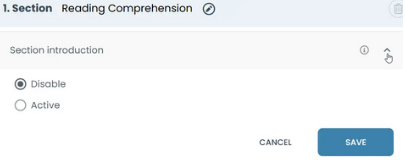
Turn on Section Introduction to display an introductory message before candidates begin the section.
- If disabled, candidates start the section immediately.
- If enabled, you can add instructions such as: "Please read each question carefully before answering."
This is useful when you want to:
- give instructions
- explain the type of questions
- provide important information before the section starts