Getting started Product Tour Question Bank Question Types Test Editor Grading and Evaluation Lockdown Browser Online Proctoring
Organization management Setting Up Your Organization General Settings Configuring Consent Process Branding Plans & Credits Understanding Subscription Plans Managing Credits Changing Subscription Plans Billing Settings Credit Notifications Users and Collaboration Roles and Permissions Adding New Users & Assigning Roles Importing Users Organizing Users into Teams Advanced Permissions & Access Control User Login Controls Monetization
Question Bank Creating a Question Adding Image Adding Audio Adding Video Adding File Editing Layout Adding Feedback Adding Hint Math Input Importing Questions Question Reporting Scoring Question Types Multiple Choice Questions Matching Questions Text-Based Questions Rich Content Questions Numeric Questions Coding Questions Audio Recording Video Recording Photo Capture File Upload Fill-in-a-Table Questions Organizing Questions Folders and tags Batch update Schema Browsing Questions Exporting Questions Presets Composites
Tests (deprecated) Creating a Test Pages Sections Adding Questions Previewing Test Setting Profile Test Type Test Navigation Time-Limits Auto Numberings Mandatory Question Security Shuffling Deprecated Customize Section Weights Randomization Reporting
Tests Creating a New Test Test Settings Quick Exam Creation Creating Randomized Tests Adding Questions Sections Automatic Question Exclusion Shuffling Pages Time Limit Navigation Control Section Introduction Page Structure Shuffle Questions Time Limit Layout
Tests Page Structure

Static Page Builder

Build test pages manually by adding and arranging questions.

Updated 2026/04/15

The Static Page Builder allows you to create pages using specific questions that you choose manually.

The page structure remains fixed, meaning every candidate sees the same questions in the same order.

Difference from Random Page Picker

Static Page Builder

You create pages manually and all candidates see the same pages and same content.

Random Page Picker

You create multiple alternative pages, and the system randomly selects which ones to show.

Key difference:

Static = fixed pages (no variation)

Random = predefined pages + random selection

Why to use it

- Provides full control over content and order.

- Ensures all candidates receive the same

How to Set Up Static Page Builder in 5 Steps

STEP 1:

Click Add Question to start building the page
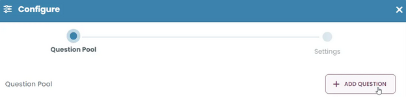
Click Add Question to open the question selection screen.

STEP 2:

Select the questions you want to add from the question pool.
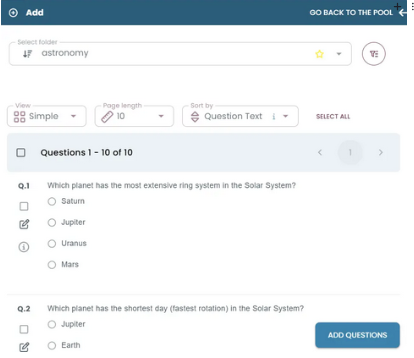
Choose questions from the pool and click Add Questions.

STEP 3:

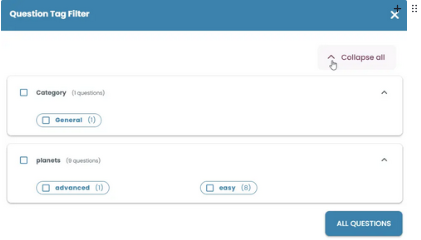
Use the filter icon to narrow down questions by tags when needed.

Click the filter icon to open advanced filtering options and refine your question selection.
Use Question Tag Filter to find specific questions more easily.

STEP 4:

Configure the page settings, such as the title, number of questions, number of pages, time limit, scoring, required response, and non-scored question options, then click Save.
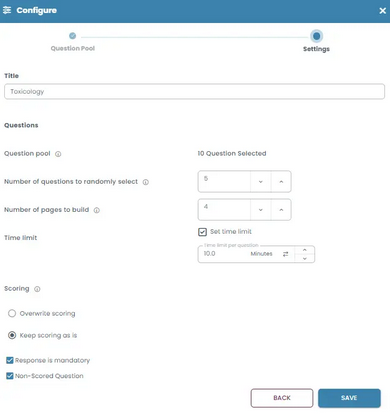
Set the page options and save the static page.

STEP 5:

After saving, the static pages appear in the section, and you can review their settings and questions on the page.
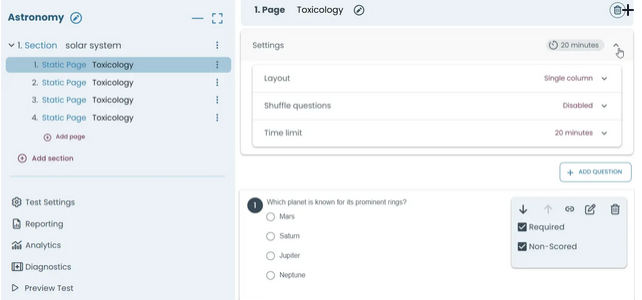
Review the created static pages and manage their questions and settings.
Go back