

Mandatory Questions
Mandatory Questions settings define how the system handles unanswered questions. You can apply different rules at page, section, and test levels to control candidate behavior.
Control how unanswered questions are handled.
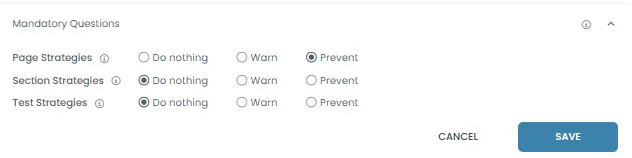
Mandatory Questions
Defines how unanswered questions are handled at page, section, and test levels.

1. Page Strategies
Controls behavior when a candidate tries to leave a page with unanswered questions.
Example: If “Prevent” is selected → candidate cannot move to the next page without answering.
Result: Enforces answer completion at the page level.

2. Section Strategies
Controls behavior when a candidate tries to leave a section with unanswered questions.
Example: If “Warn” is selected → candidate is alerted but can still proceed.
Result: Applies rules across all pages within the section.

3. Test Strategies
Controls behavior when a candidate tries to finish the test with unanswered questions.
Example: If “Do nothing” is selected → candidate can submit without answering all questions.
Result: Defines final submission behavior.
Available Options
Do nothing
No restriction is applied.
Result: Candidates can proceed without answering.
Warn
Displays a warning message.
Result: Candidates are informed but can continue.
Prevent
Blocks progression until questions are answered.
Result: Candidates must answer before moving forward.