
- What is TestInvite?
- Build Your First Test
- Run Your First Assessment
- Taking the Assessment
- Viewing the Results
- Question Bank Overview
- Common Question Features
- Scoring
- Question Types
- Question Authoring
- Browsing Questions
- Content Blocks
- Media Library
- Metadata Rules & Schema
- Tests Overview
- My Tests
- Creating a Test
- The Test Editor
- Test Settings
- Sections & Pages
- Adding Questions
- Page Builders
- Test Profile
- Reporting
- Test Papers
- Analytics
- Publishing a Test
- Test Library
- Marketplace
- Tasks Overview
- Creating a Task
- Task Dashboard
- Steps
- Task Settings
- Candidates
- Test Sessions
- Sent Mails
- Proctoring
- Analytics
- Analytics Overview
- Test Analytics
- Question Analytics
- Per-Question Analytics
- Results Explorer
- Segment Analysis
Question Types
A quick reference guide to all question types available in TestInvite — what each is for and when to use it.
TestInvite supports 11 question types covering everything from classic multiple choice to code evaluation and AI-graded audio responses. This page gives you a quick overview of each type and when to use it. Every type has its own dedicated page with full configuration details.
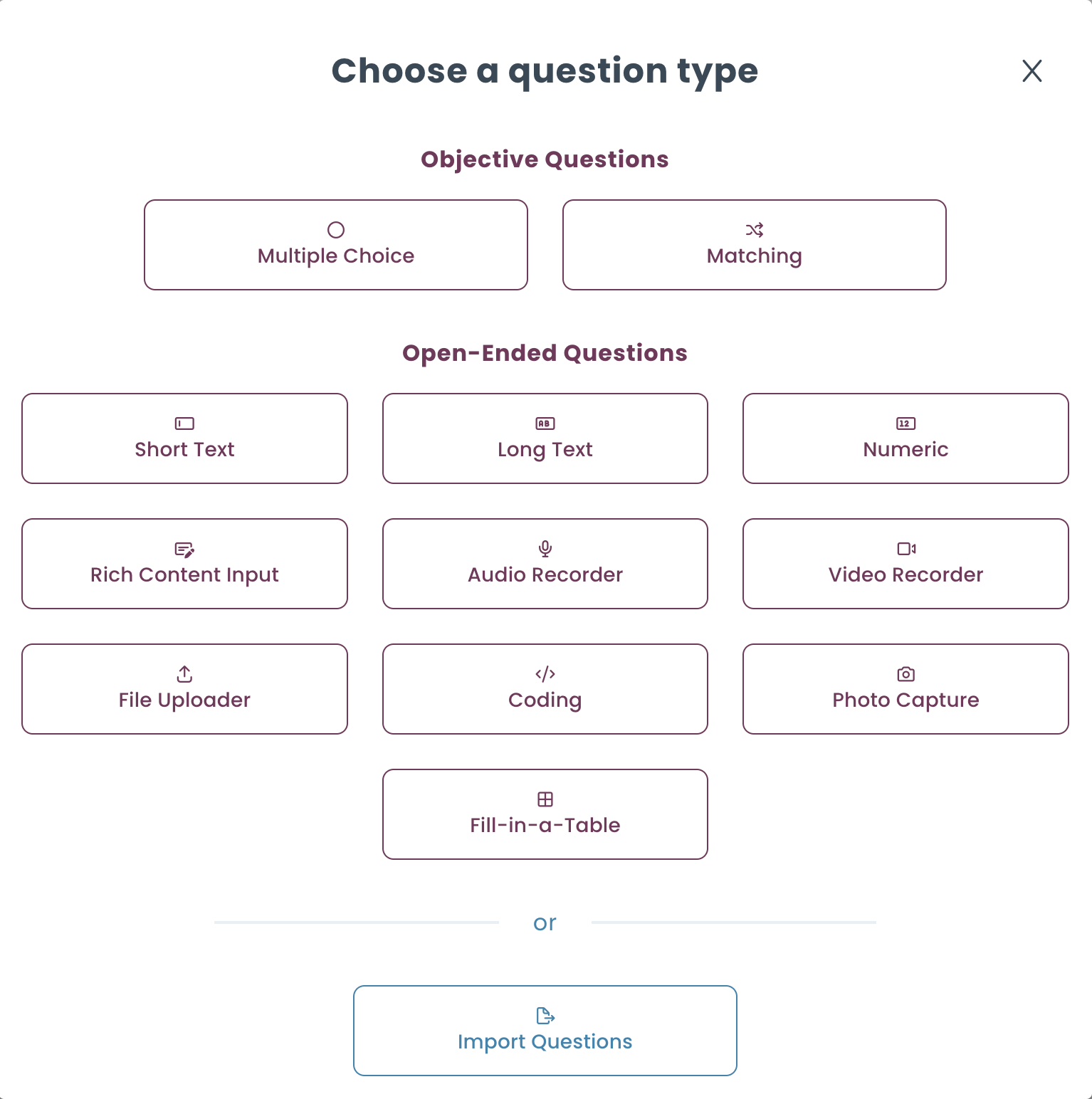
Multiple Choice
Present a list of answer choices and mark one or more as correct. Supports single-answer and multi-answer modes, answer shuffling, negative marking, and minimum/maximum selection constraints.
Best for: knowledge checks, aptitude tests, certification exams, any scenario with a definitive correct answer.
Evaluation: Auto-graded — points awarded or deducted per choice based on correctness.
Short Answer
A single-line text input. Candidates type a brief response. Supports optional virtual keyboard.
Best for: vocabulary, definitions, fill-in-the-blank, short factual answers.
Evaluation: Auto-graded via exact match or regex rules; AI evaluation with a custom grading prompt; manual review; rubric scoring.
Long Answer
A multi-line or rich text editor for extended written responses.
Best for: essay questions, case studies, open-ended analysis, written communication assessment.
Evaluation: AI evaluation with a custom grading prompt; manual review; rubric scoring.
Numeric
A number-only input field. Supports standard numbers, scientific notation, or both. Control decimal precision, thousands separators, and acceptable value ranges.
Best for: mathematics, engineering, finance, science assessments where exact or range-based numerical answers are required.
Evaluation: Auto-graded via exact value or acceptable range rules; rubric scoring.
Code
A full code editor with syntax highlighting, supporting 17+ programming languages. You can provide an initial code template.
Best for: software developer assessments, programming aptitude tests, SQL and data engineering evaluations.
Evaluation: AI evaluation with a custom grading prompt; manual review; rubric scoring.
Audio
Candidates record an audio response directly in the browser or upload an audio file.
Best for: language proficiency tests, communication skills assessment, oral examination formats.
Evaluation: AI evaluation with a custom grading prompt; manual review; rubric scoring.
Video
Candidates record a video response in the browser or upload a video file.
Best for: presentation skills, behavioral interview simulations, video-based competency assessments.
Evaluation: AI evaluation with a custom grading prompt; manual review; rubric scoring.
File Upload
Candidates upload a file of any type — a document, spreadsheet, PDF, archive, or any other format.
Best for: portfolio submissions, written assignments, project deliverables, take-home tasks.
Evaluation: Manual review; rubric scoring.
Photo
Candidates capture a photo using their device camera or upload an image file.
Best for: practical skills assessment, handwritten work submission, visual identification tasks.
Evaluation: Manual review; rubric scoring.
Tabular
A spreadsheet-style input where candidates fill in cells of a table.
Best for: data entry exercises, structured analysis tasks, multi-variable problem solving.
Evaluation: Manual review; rubric scoring.
Match
Candidates pair items from a left-hand list with options from a right-hand list. Supports four layout modes: dropdown, inline options, matrix, and drag-and-drop. You can set minimum and maximum matching constraints.
Best for: vocabulary matching, concept-definition pairing, classification exercises, relationship mapping.
Evaluation: Auto-graded — each correctly matched pair earns points independently (partial scoring supported).
Rubrics & AI Evaluation
Two powerful features cut across multiple question types:
- Rubrics — a structured scoring framework that can be attached to any input question type (Short Answer, Long Answer, Numeric, Code, Audio, Video, File, Photo, Tabular). Rubrics let reviewers score responses against defined criteria in a consistent, repeatable way. Two rubric types are available — Level Selection and Score Entry — both covered in detail under Rubric Scoring.
- AI Evaluation — supported for Short Answer, Long Answer, Code, Audio, and Video questions. You provide a custom grading prompt and the AI scores the response automatically. Covered in detail under AI Evaluation.
Quick Reference
| Question Type | Auto-graded | AI Evaluation | Rubric | Manual Evaluation |
|---|---|---|---|---|
| Multiple Choice | ✓ | – | – | – |
| Short Answer | ✓ (match / regex) | ✓ | ✓ | ✓ |
| Long Answer | – | ✓ | ✓ | ✓ |
| Numeric | ✓ (value / range) | – | ✓ | ✓ |
| Code | – | ✓ | ✓ | ✓ |
| Audio | – | ✓ | ✓ | ✓ |
| Video | – | ✓ | ✓ | ✓ |
| File Upload | – | – | ✓ | ✓ |
| Photo | – | – | ✓ | ✓ |
| Tabular | – | – | ✓ | ✓ |
| Match | ✓ (per pair) | – | – | – |