
- What is TestInvite?
- Build Your First Test
- Run Your First Assessment
- Taking the Assessment
- Viewing the Results
- Question Bank Overview
- Common Question Features
- Scoring
- Question Types
- Question Authoring
- Browsing Questions
- Content Blocks
- Media Library
- Metadata Rules & Schema
- Tests Overview
- My Tests
- Creating a Test
- The Test Editor
- Test Settings
- Sections & Pages
- Adding Questions
- Page Builders
- Test Profile
- Reporting
- Test Papers
- Analytics
- Publishing a Test
- Test Library
- Marketplace
- Tasks Overview
- Creating a Task
- Task Dashboard
- Steps
- Task Settings
- Candidates
- Test Sessions
- Sent Mails
- Proctoring
- Analytics
- Analytics Overview
- Test Analytics
- Question Analytics
- Per-Question Analytics
- Results Explorer
- Segment Analysis
Scoring Framework
The Scoring Framework is where your organization defines the dimensions and sub-dimensions every question can be scored against — set it up once here, then assign it question by question.
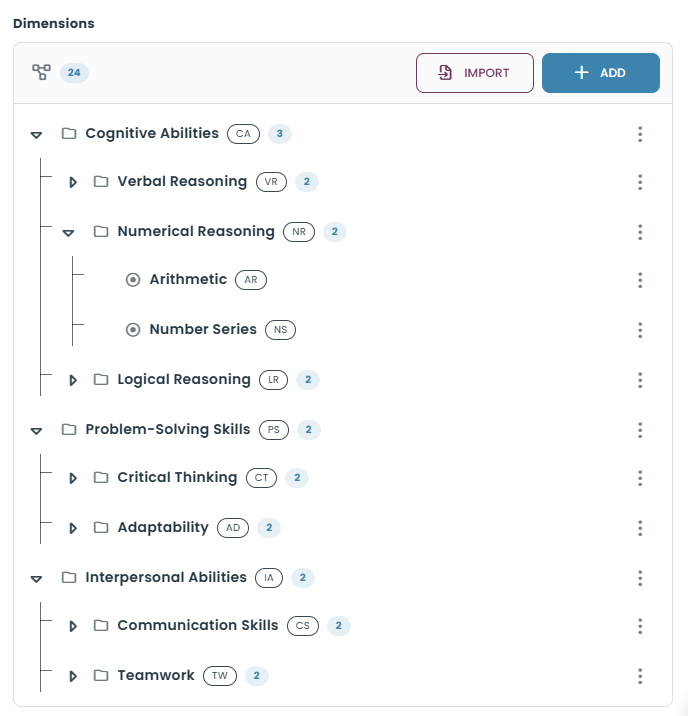
Open Scoring Framework by clicking the settings (gear) icon next to the Question Bank heading. In Question Bank Settings, select the Scoring Framework tab. The framework is organized into presets, each with its own Title, Dimensions, and Effects. Dimensions can include nested sub-dimensions for competency-based scoring.
Creating and Managing Presets
Presets appear in the list on the left. To create one, click Add Preset, enter a title, and click Save. Select a preset from the list to manage its title, dimensions, and effects.
Adding Dimensions and Sub-Dimensions
Within the selected preset, click Add in the Dimensions section, enter a Title and Code, and click Save. To create a nested competency, open the three-dot menu next to an existing dimension, choose Add Sub Dimension, enter the sub-dimension title and code, and click Save. Use the dimension's menu to edit or delete it.
Managing Effects
Each preset also has an Effects section. Use Add to create an effect definition for that preset. After making changes to the selected preset, use the page's Save button to save the framework configuration.
Why Define It Once, Centrally
Dimensions are defined once at the organization level so every question draws from the same fixed vocabulary. Without a shared framework, one question author might tag a question Communication while another uses Comms — splitting what should be one competency into two, and breaking any report that aggregates by dimension.
Assigning Dimensions to Questions
Once a dimension exists in the framework, it becomes available to assign to any question in the bank (see Scored Dimensions). A question can be scored against one or more dimensions, and test results then show a breakdown by dimension in addition to the overall score.
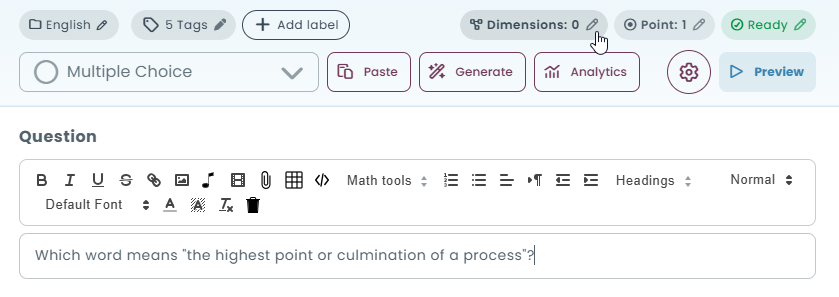
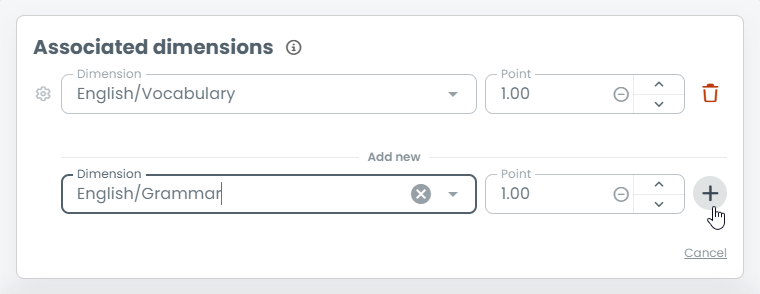
Set up the Scoring Framework before your team starts tagging questions with dimensions — changing dimension names later means going back through every question that already references the old name.