
Test admins

How to Evaluate Long Answers with AI Using Custom Grading Criteria

Learn how to evaluate long written answers with AI using custom grading criteria, review scores and feedback, and configure Scored Dimensions.

TestInvite allows you to automatically evaluate long-form written responses using AI. You can define your own grading criteria, assign points to different aspects of an answer, and provide detailed instructions for how AI should evaluate candidate responses.

This is particularly useful for essays, written explanations, and other open-ended assessments where answers cannot be evaluated using simple right-or-wrong rules.

This guide explains how to create a Long Text question, configure AI Evaluation with custom grading criteria, review AI-generated scores and feedback, and use Scored Dimensions for more advanced competency-based scoring.

Step 1: Create a Long Text Question

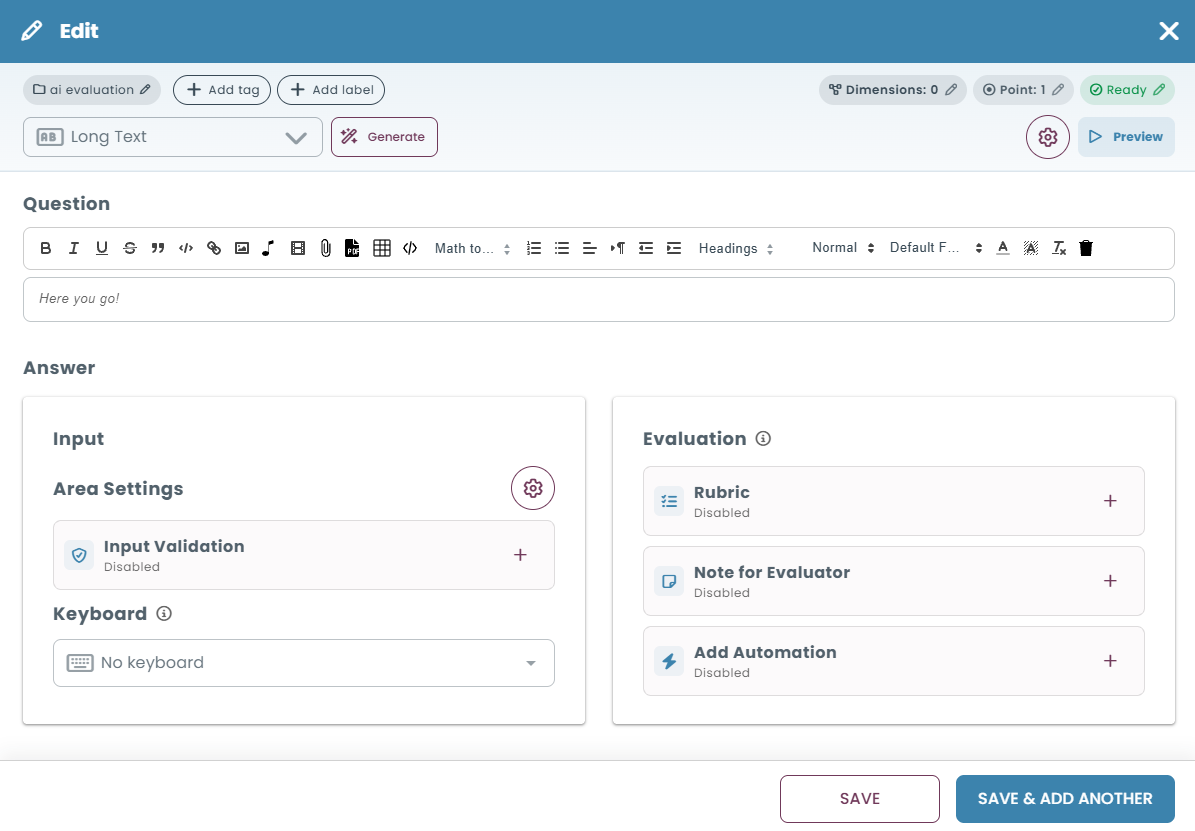
  1. Open the Question Bank and create a new question.
    1. Select Long Text as the question type.
      1. Enter your question or writing prompt.
        1. Under Answer → Input, configure the answer area as needed.
          1. Save your question.

            Long Text questions allow candidates to provide extended written responses, such as essays, explanations, and structured arguments.
            Example Question

            Should smartphone use be restricted during school lessons?

            Write a short argumentative essay (approximately 150–250 words) explaining your opinion.

            In your response:

            • Clearly state whether you support restrictions, oppose them, or prefer a balanced approach.
              • Present at least two reasons supporting your position.
                • Support your arguments with relevant examples or real-life situations.
                  • Consider at least one argument from an opposing perspective.
                    • Conclude with your recommendation for how smartphones should be managed during lessons.

                      This type of question allows students to express different opinions while being evaluated according to the same grading criteria.

                      Step 2: Define Your Custom Grading Criteria

                      Before configuring AI Evaluation, determine which aspects of the response should be assessed and how many points each criterion should contribute to the overall score.

                      For the example question, you could use the following grading criteria:

                      Grading criterionMaximum points
                      Clear Position and Task Response10
                      Quality of Arguments and Reasoning30
                      Supporting Examples20
                      Consideration of an Opposing Perspective15
                      Practical Recommendation15
                      Clarity and Organization10
                      Total100

                      You can provide these criteria directly in your AI evaluation instructions, together with the requirements for full marks, partial credit, and missing or incorrect responses.

                      Example AI Evaluation Instructions

                      The following instructions can be used as a starting point and customized according to your assessment requirements.

                      Evaluation Objective

                      Evaluate the student's argumentative essay about whether smartphone use should be restricted during school lessons. Evaluate the response according to the six criteria below. The maximum total score is 100 points.

                      1. Clear Position and Task Response (10 points)

                      • Award 10 points when the student clearly states a position and directly addresses the question.
                        • Award partial points when the position is present but unclear or insufficiently developed.
                          • Award 0 points when no identifiable position is provided or the response is unrelated to the question.

                            Accept arguments supporting restrictions, opposing restrictions, or proposing a balanced approach. Do not favor any particular position.

                            2. Quality of Arguments and Reasoning (30 points)

                            • Evaluate the first two distinct reasons supporting the student's position.
                              • Award up to 15 points for each reason.
                                • Award full points for a relevant, logical, and well-explained reason.
                                  • Award partial points for a relevant but insufficiently developed reason.
                                    • Award 0 points for an irrelevant or missing reason.

                                      3. Supporting Examples (20 points)

                                      • Evaluate up to two distinct examples supporting the student's arguments.
                                        • Award up to 10 points for each example.
                                          • Award full points when an example clearly strengthens or demonstrates the related argument.
                                            • Award partial points for vague or loosely connected examples.
                                              • Award 0 points for missing or irrelevant examples.

                                                Reasonable hypothetical classroom situations are acceptable.

                                                4. Consideration of an Opposing Perspective (15 points)

                                                • Award 15 points when the student identifies a specific opposing argument and meaningfully addresses it.
                                                  • Award 8 points when a recognizable opposing argument is provided but discussed only briefly.
                                                    • Award 5 points when an opposing argument is explicitly acknowledged without meaningful discussion.
                                                      • Award 0 points when no recognizable opposing argument is presented.

                                                        A balanced position alone does not automatically satisfy this criterion. Evaluate only arguments actually included in the response.

                                                        5. Practical Recommendation (15 points)

                                                        • Award 15 points for a clear, realistic, and sufficiently specific recommendation consistent with the student's reasoning.
                                                          • Award partial points for a recommendation that lacks detail or practicality.
                                                            • Award 0 points when no meaningful recommendation is provided.

                                                              6. Clarity and Organization (10 points)

                                                              • Award 10 points when the response is clear, coherent, and logically organized.
                                                                • Award partial points when the response is understandable but contains organizational weaknesses.
                                                                  • Award 0 points when the response is difficult to follow or lacks meaningful organization.

                                                                    Do not excessively penalize minor spelling or grammatical errors when the meaning remains clear.

                                                                    General Scoring Instructions

                                                                    1. Evaluate all six criteria independently based on the candidate's actual response.
                                                                      1. Assign a score between 0 and the maximum points available for each criterion.
                                                                        1. Award partial credit when a response meets only some of the requirements.
                                                                          1. Do not award points for missing content or exceed the maximum score for any criterion.
                                                                            1. Accept alternative but logically valid arguments and examples.
                                                                              1. Do not reward or penalize the student's personal position on smartphone restrictions.
                                                                                1. Treat the suggested word count as guidance rather than an automatic scoring penalty.
                                                                                  1. Calculate the overall score by adding the six criterion scores.
                                                                                    1. Provide a breakdown showing the points awarded for each criterion and a brief explanation.
                                                                                      1. Summarize the student's strengths and areas for improvement.
                                                                                        1. Verify the total score before finalizing the evaluation.

                                                                                          These instructions demonstrate how AI Evaluation can be customized to follow specific grading requirements instead of relying solely on general assessment criteria.

                                                                                          You can adapt the criteria, point allocations, expected content, and partial-credit rules to suit different question types and learning objectives.
                                                                                          Step 3: Configure AI Evaluation

                                                                                          Once your grading criteria are ready, configure AI Evaluation for the question.

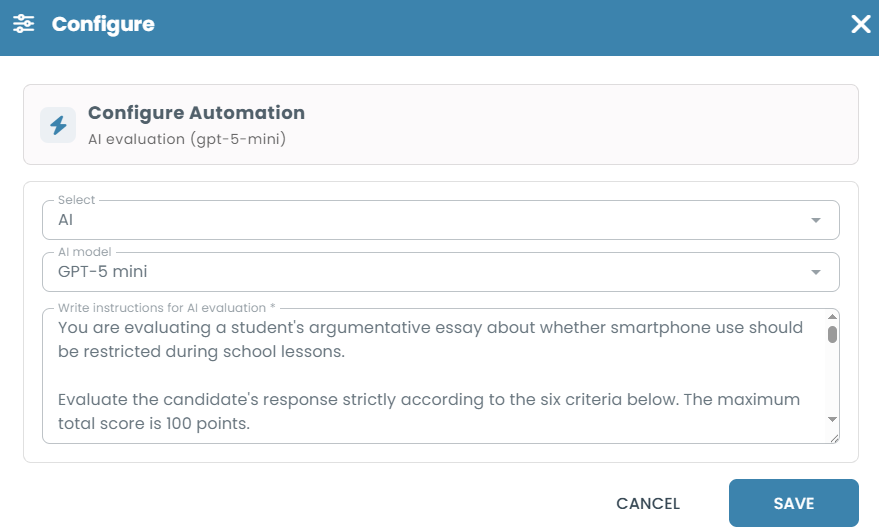
                                                                                          1. Open your Long Text question in the Question Bank.
                                                                                            1. Locate the Evaluation section under Answer.
                                                                                              1. Click Add Automation (+) and select AI Evaluation.
                                                                                                1. Choose an available model from the AI model dropdown.
                                                                                                  1. Select the appropriate Language.
                                                                                                    1. Enter your grading criteria in Write instructions for AI evaluation.
                                                                                                      1. Click Save to configure the automation, then save the question.

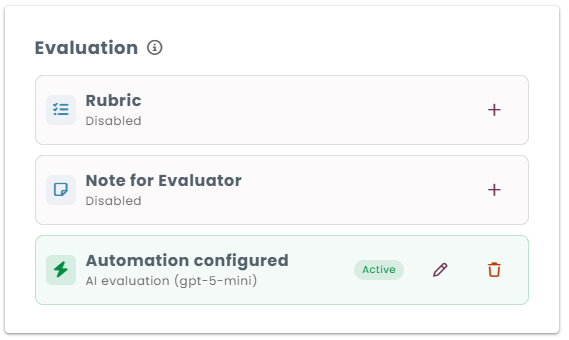
                                                                                                        Once configured, the Evaluation section displays Automation configured, indicating that AI Evaluation is active.
                                                                                                        For additional information, see AI Evaluation.

                                                                                                        Step 4: Collect and Automatically Evaluate Written Responses

                                                                                                        When candidates encounter a Long Text question during a test, they can type their responses directly into the provided answer area.

                                                                                                        After submission, TestInvite automatically evaluates the written response using the configured AI instructions.

                                                                                                        The evaluation produces:

                                                                                                        • An overall success rate (0–100%).
                                                                                                          • Written reasoning and feedback explaining the assessment.
                                                                                                            • Criterion-level evaluation details, when requested through the grading instructions.

                                                                                                              Example AI Evaluation Result

                                                                                                              Consider a student who argues that smartphone use should be restricted because it distracts students and reduces classroom interaction.

                                                                                                              The student provides relevant reasons and examples but does not address an opposing perspective.

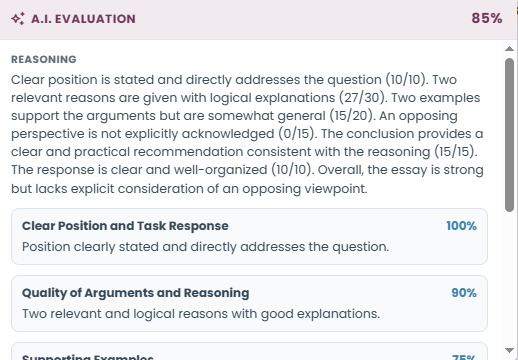
                                                                                                              When evaluated using the example grading instructions, AI can identify which criteria have been fulfilled and which require improvement.

                                                                                                              The evaluation details may display separate results for:

                                                                                                              • Clear Position and Task Response
                                                                                                                • Quality of Arguments and Reasoning
                                                                                                                  • Supporting Examples
                                                                                                                    • Consideration of an Opposing Perspective
                                                                                                                      • Practical Recommendation
                                                                                                                        • Clarity and Organization

                                                                                                                          Each criterion can include a percentage and written explanation describing how the student's response performed.

                                                                                                                          These criterion-level details are generated through the AI evaluation instructions. You do not need to configure Scored Dimensions simply to request this type of feedback.

                                                                                                                          The overall success rate is used with the question's configured point value to determine the question score.
                                                                                                                          Step 5: Review AI Evaluation Results

                                                                                                                          Administrators can review AI-generated evaluations from the candidate's test session report.

                                                                                                                          To review a written response:

                                                                                                                          1. Open the candidate's test session report.
                                                                                                                            1. Select Answers from the left navigation menu.
                                                                                                                              1. Locate the Long Text question.
                                                                                                                                1. Review the candidate's submitted response.
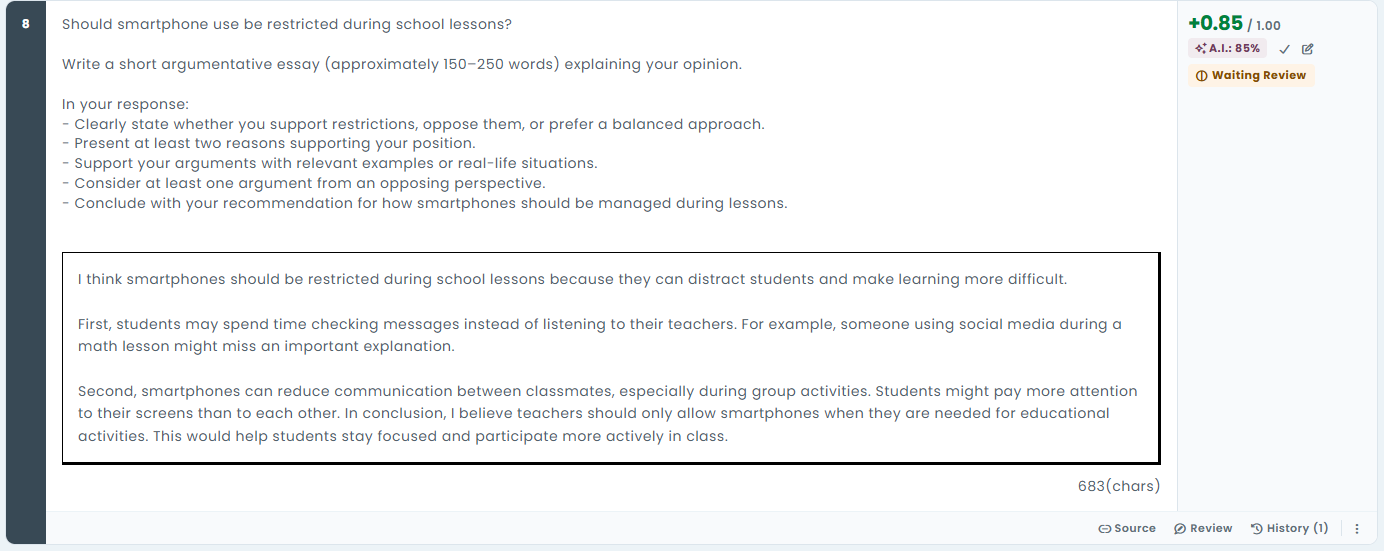
                                                                                                                                  1. Click the AI evaluation score to view the evaluation details.

                                                                                                                                    The evaluation details display the overall AI score and written reasoning. When the grading instructions include multiple criteria, the details may also provide criterion-level scores and explanations.
                                                                                                                                    Approve the AI Evaluation

                                                                                                                                    An AI-evaluated answer awaiting confirmation displays Waiting Review.

                                                                                                                                    Click the checkmark icon (✓) next to the AI evaluation score to approve it.

                                                                                                                                    The status changes to Approved, and the AI-generated score is retained.

                                                                                                                                    Override with a Manual Evaluation

                                                                                                                                    Administrators can also replace an AI-generated score with a manual evaluation.

                                                                                                                                    1. Click the manual evaluation (edit) icon next to the evaluation score.
                                                                                                                                      1. Enter the new score as a percentage or point value.
                                                                                                                                        1. Click Apply.

                                                                                                                                          The manual evaluation takes precedence over the AI-generated score.

                                                                                                                                          Step 6: Use Scored Dimensions for Competency-Based Scoring (Optional)

                                                                                                                                          Defining multiple criteria through AI evaluation instructions is useful when you want to assess different aspects of a response and receive detailed feedback.

                                                                                                                                          However, you may also want to record and report the performance of individual competencies separately.

                                                                                                                                          For this purpose, TestInvite provides Scored Dimensions.

                                                                                                                                          What Are Scored Dimensions?

                                                                                                                                          Scored Dimensions allow a single response to be evaluated across multiple competencies, with each competency receiving its own score.

                                                                                                                                          Scored Dimensions are part of TestInvite's scoring and reporting system.

                                                                                                                                          For example, an argumentative essay may measure three competencies:

                                                                                                                                          Scored dimensionWhat it measures
                                                                                                                                          ArgumentationQuality of reasoning and development of arguments
                                                                                                                                          Use of EvidenceRelevance and effectiveness of supporting examples
                                                                                                                                          Written CommunicationClarity, coherence, and organization

                                                                                                                                          Each dimension is evaluated independently rather than automatically inheriting the question's overall success rate.

                                                                                                                                          This can be particularly useful when the same competencies are assessed across multiple questions and need to be analyzed or reported separately.

                                                                                                                                          How to Configure Scored Dimensions

                                                                                                                                          1. Open the question in the Question Bank.
                                                                                                                                            1. Click Dimensions at the top of the question editor.
                                                                                                                                              1. Select the Scored dimensions tab.
                                                                                                                                                1. Enable Use scored dimensions for this question.
                                                                                                                                                  1. Select the dimensions you want to evaluate from the dropdown. Available dimensions are defined in Question Bank Settings → Scoring Framework.
                                                                                                                                                    1. Assign a Point value to each dimension.
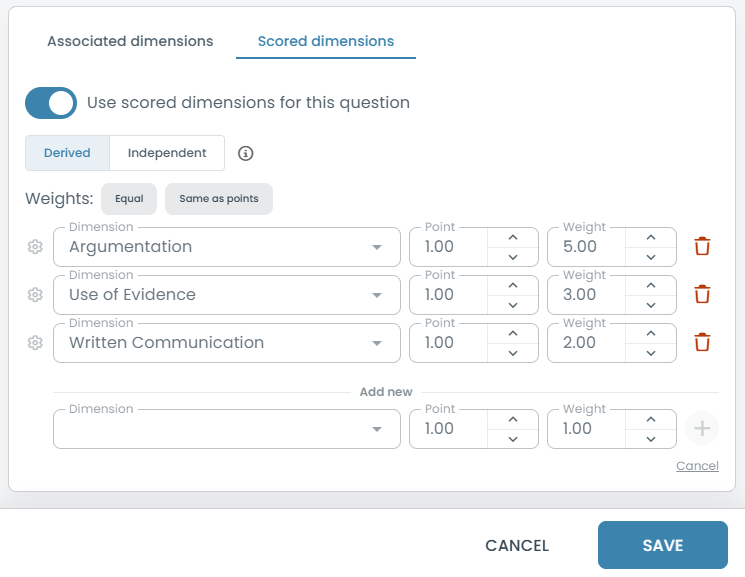
                                                                                                                                                      1. If using the Derived scoring strategy, configure the Weight for each dimension.
                                                                                                                                                        1. Click + to add additional dimensions.
                                                                                                                                                          1. Click Save.

                                                                                                                                                            Scored Dimensions can be used with manually evaluated or AI-evaluated question types.
                                                                                                                                                            Scoring Strategies: Derived vs. Independent

                                                                                                                                                            When configuring Scored Dimensions, you can choose how the dimension scores relate to the question's overall score.

                                                                                                                                                            Derived

                                                                                                                                                            In Derived mode, the question's overall success rate is calculated as a weighted average of the dimension scores.

                                                                                                                                                            For example, consider the following dimensions:

                                                                                                                                                            DimensionWeightEvaluation
                                                                                                                                                            Argumentation50%80%
                                                                                                                                                            Use of Evidence30%60%
                                                                                                                                                            Written Communication20%90%

                                                                                                                                                            With these weights and scores, the overall question success rate would be:

                                                                                                                                                            (80 × 0.50) + (60 × 0.30) + (90 × 0.20) = 76%

                                                                                                                                                            This approach is useful when the overall question result should be determined directly by performance across individual competencies.

                                                                                                                                                            You can also assign a dimension a weight of 0 to include it in analysis and reporting without affecting the overall question score.

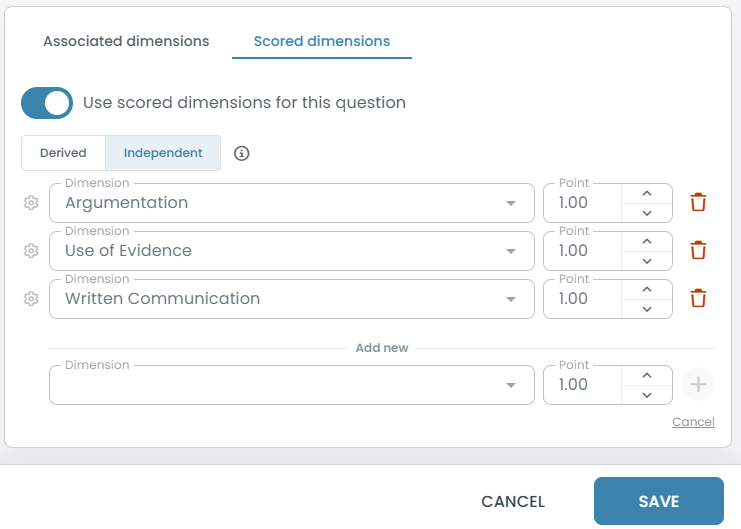
                                                                                                                                                            Independent

                                                                                                                                                            In Independent mode, the overall question score is evaluated separately from the dimension scores.

                                                                                                                                                            For example, you may want to evaluate an argumentative essay holistically while also measuring Argumentation, Use of Evidence, and Written Communication independently.

                                                                                                                                                            The overall essay score is not calculated from these dimension scores. Instead, individual dimension results can be used for competency analysis and reporting.

                                                                                                                                                            This approach is useful when you want to evaluate both the overall quality of a response and the specific competencies demonstrated within it.
                                                                                                                                                            For detailed configuration guidance, see Scored Dimensions.

                                                                                                                                                            Important Notes

                                                                                                                                                            • Custom grading criteria: You can define your own evaluation criteria, point allocations, expected content, and partial-credit rules through AI evaluation instructions.
                                                                                                                                                              • Testing your instructions: We recommend testing your instructions with sample responses and refining them as needed to achieve the desired evaluation results.
                                                                                                                                                                • Criterion-level feedback: AI can generate individual criterion scores and explanations based on your grading instructions.
                                                                                                                                                                  • Scored Dimensions: This feature supports independent competency scoring and reporting, with configurable scoring strategies.
                                                                                                                                                                    • Human oversight: Administrators can review, approve, or override AI-generated evaluations.
                                                                                                                                                                      • Availability: AI Evaluation is available in the new TestInvite platform. Access and usage limits depend on the subscription plan.

                                                                                                                                                                        Related Documentation